Graded cards: verify, then compare
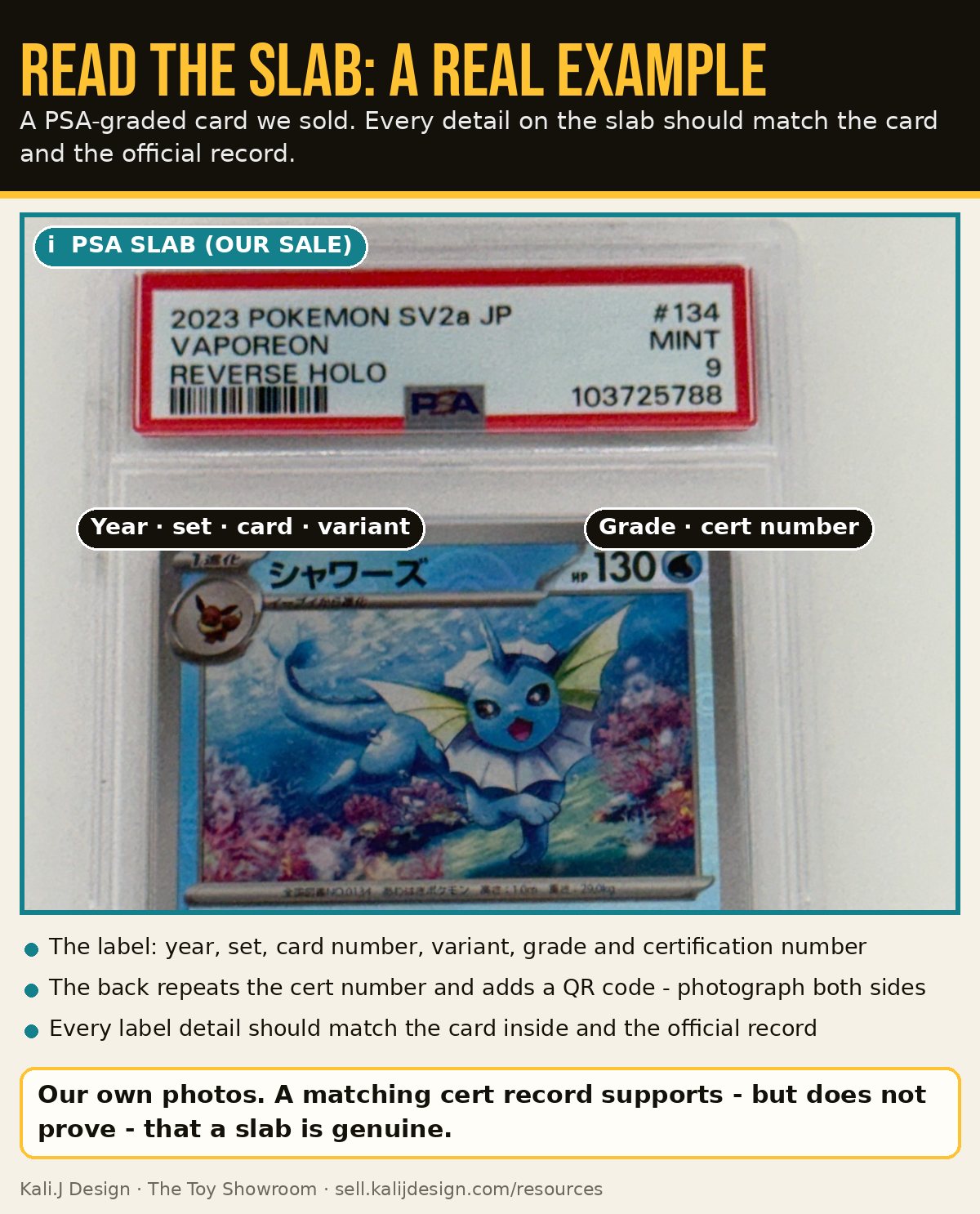
- Find the certification number on the label (many holders repeat it, with a barcode or QR code, on the back).
- Look it up on the grading company's own website - never through a link someone sends you.
- Compare the record with the card in front of you: card name, set, number, year, variant, language and grade. Where the grader shows images, compare those too.
- Inspect the holder and label. PSA's buyer guide points to warning signs such as a clouded or cracked holder, a holder that flexes, and label security features (PSA security guide). CGC describes its label and holder security features on its holder page.
- If anything does not match, stop. Treat it as high risk until the grading company or an expert has looked at it.
- Third-party resourcePSA certification verification
Look up a PSA certification number. - Third-party resourceCGC Cards certification lookup
Look up a CGC certification number; CGC labels also carry a QR code. - Third-party resourceSGC certification lookup
Look up an SGC certification code. - Third-party resourceTAG Grading certificate search
Look up a TAG certificate. - Third-party resourceBeckett graded card lookup
Beckett's online lookup was offline for maintenance when we last checked (September 2026). Hold high-value Beckett purchases until it can be verified.
Raw cards: what to compare
- The official card. Compare with the Pokémon TCG card database. It covers modern sets but not the earliest vintage sets, so vintage cards need a trusted collector reference or a known genuine card.
- Set symbol and card number - correct symbol, correct number and set total.
- Text and fonts - spelling, attack text, HP, weakness and copyright line consistent with the real card.
- Print quality - sharp, not blurry or washed out.
- Holo or foil pattern - consistent with genuine cards of the same set.
- The back - TCGplayer calls the back design one of the most reliable comparison points (TCGplayer).
- Card stock and feel - compare with a genuine common from a similar era.
- Language - make sure the card matches the language and region you think it is.
Pokémon's support article describes holding a card up to a bright light as one quick check, while TCGplayer cautions against relying on the light test. Use it only as one clue among many, and never as proof either way. Do not tear or damage cards to "test" them.
Our authentication statuses
No obvious concerns found
What it means: Our checks did not find a problem.
Why it matters: This is not a confirmation of authenticity - especially for raw cards and sealed product.
Needs additional review
What it means: The evidence is incomplete or mixed - for example, the certification number has not been checked yet, or key photos are missing.
Why it matters: We ask for more photos, a lookup, or an in-person look before any offer.
High risk - do not buy yet
What it means: A concrete red flag: a record that does not match, a missing certification, tampering signs or a price that does not make sense.
Why it matters: We do not buy until the concern is resolved by the grading company or an expert.
When to get expert help
For valuable raw cards, ask an experienced local card shop - Pokémon's own support article suggests this - or use a professional grading service. For slabs, contact the grading company if the record and the holder do not agree.
Common mistakes
- Using a lookup link sent by the sellerType the grading company's address yourself.
- Checking only the numberCompare the card, grade and label as well.
- Relying on one trickNo single test proves a card is real or fake.
Related guides
Found one?
Seller Network members can snap a photo and ask the Sourcing Copilot. Anyone can send photos for an official quote based on real sold prices.
Looking to buy instead? Shop Pokémon at The Toy Showroom